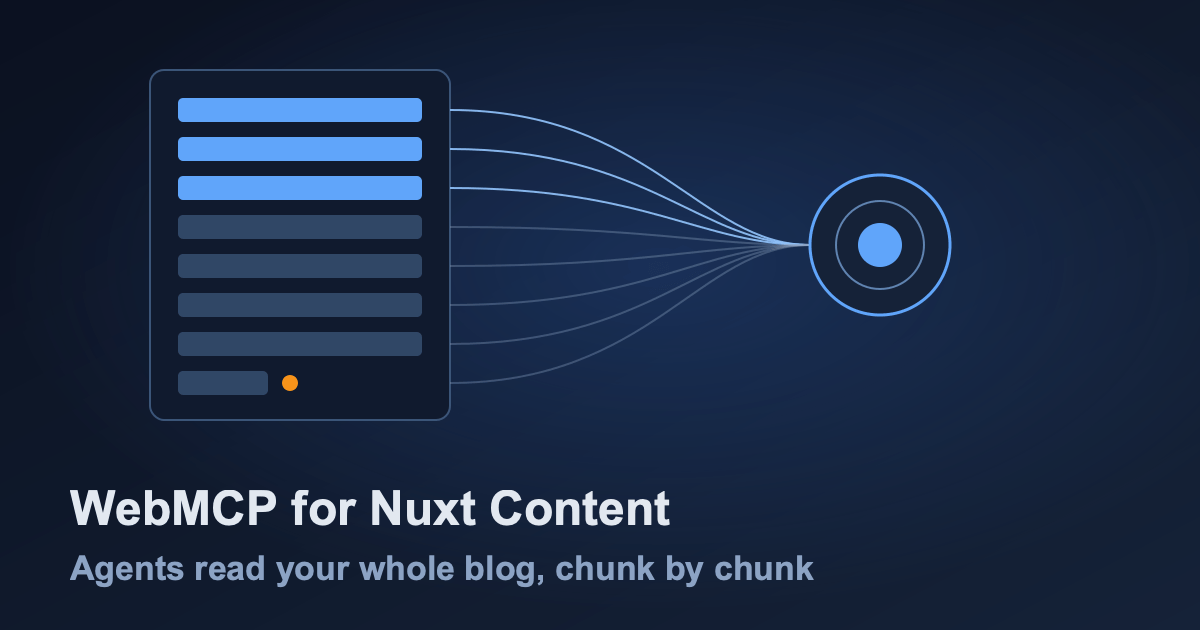
WebMCP for Nuxt Content: Agents Read Your Whole Blog
I built nuxt-content-webmcp, an open-source Nuxt module that gives in-browser AI agents four read-only tools for a Nuxt Content site. In a test on this blog, Gemini read a 6,582-character post in 8 chunks from one static JSON file.

Niklas Grieger
WebMCP is a new browser API that lets a web page hand tools to an AI agent running in the browser. Instead of scraping the DOM, the agent calls functions the page registered on document.modelContext, gets JSON back, and works with that. Chrome started an origin trial for it in version 149, and Edge followed in 150.
A blog fits this well, because Nuxt Content already knows every post's title, description, date, tags and body. So I wrote nuxt-content-webmcp, a Nuxt module that turns that data into four read-only tools, and put it on this site. It's open source and on npm.
Above all, I wanted an agent to be able to read a whole post, from the first line to the last.
Reading a 6,582-character post in 8 calls
Chrome's guidance for WebMCP is to keep each tool result under 1,500 characters. A blog post is usually longer than that. If a tool returns the first 1,500 characters and stops, the agent only ever sees the intro.
So get_content_page returns the post in chunks. Each result carries the text from offset, plus nextOffset and totalLength, and the tool description tells the agent to call again with offset=nextOffset until it's null. Chunks end at whitespace, and the chunk size shrinks when needed so the whole result, metadata included, stays under the limit.
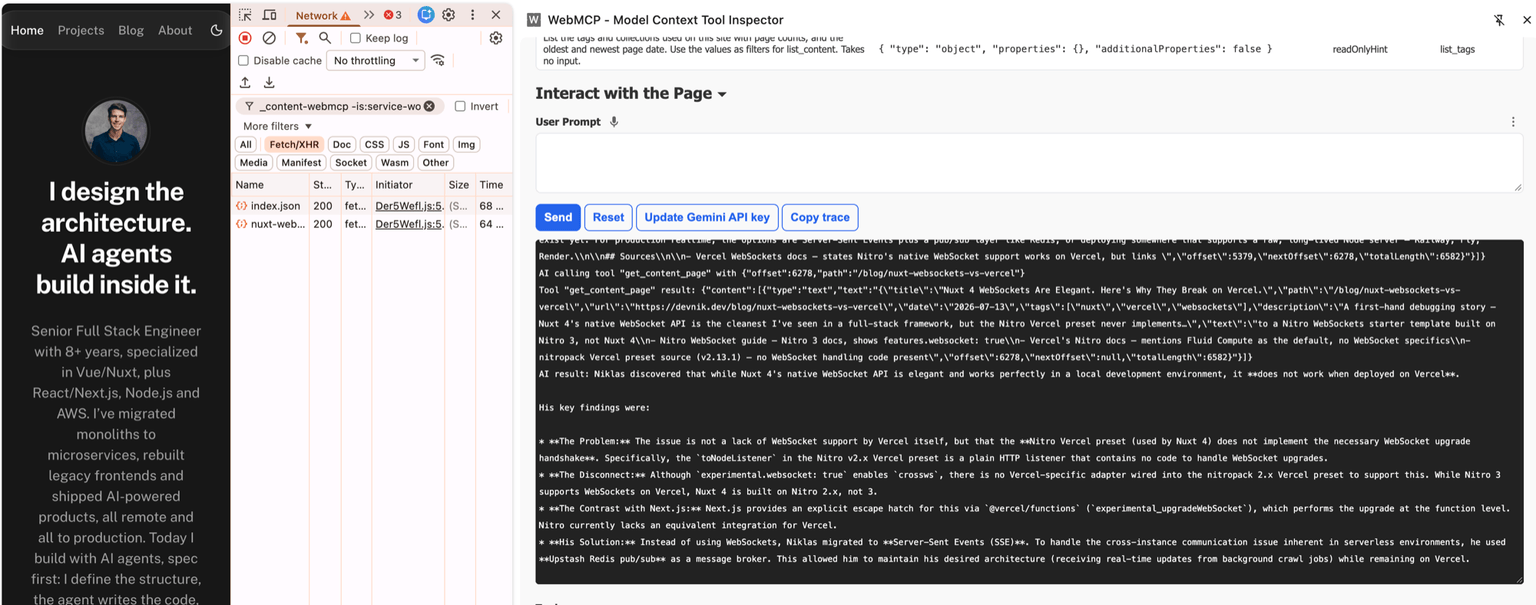
I tested it with the Model Context Tool Inspector, a Chrome extension that connects the tools of the current tab to Gemini (here gemini-3.1-flash-lite). The question:
What did Niklas find out about Nuxt WebSockets on Vercel? Read the whole post before answering.
Gemini searched for "Nuxt WebSockets Vercel", got exactly one hit (my WebSockets post), and then read it like this:
| Call | offset | nextOffset |
|---|---|---|
| 1 | 0 | 900 |
| 2 | 900 | 1796 |
| 3 | 1796 | 2693 |
| 4 | 2693 | 3587 |
| 5 | 3587 | 4480 |
| 6 | 4480 | 5379 |
| 7 | 5379 | 6278 |
| 8 | 6278 | null |
The eight calls covered all 6,582 characters, without gaps or overlap. The answer covered the whole post: the missing upgrade handshake in Nitro's Vercel preset, the comparison with Next.js and experimental_upgradeWebSocket, and the switch to Server-Sent Events with Upstash Redis at the end. I checked each point against the post. Most of it is well past the first 1,500 characters.
In the Network tab, those 8 calls caused one request: the post's text as a small JSON file. The module fetches it once and cuts the chunks in the browser.
Four tools, built from one static index
The module registers four tools when the page loads:
search_content- keyword search over titles, tags, descriptions and a short excerptlist_content- list posts, filtered by tag, collection or date rangeget_content_page- read one post in chunks, as abovelist_tags- the tags and collections with post counts, and the oldest and newest date
All four are marked read-only. search_content and get_content_page are also marked as returning untrusted content, so the agent knows the text is site content and not instructions.
At build time, the module writes two kinds of static files: an index with one entry per post (title, description, path, date, tags, a 280-character excerpt) and one file per post with its plain text. For this blog's 13 posts, the index is 9.1 KB. Nothing from the content goes into the JavaScript bundle. The index is fetched on the first tool call, and a post's text when an agent reads that post.
Search, filtering and paging all run in the browser on that index. There's no database and no server endpoint to keep running. Prerendered files on a CDN are enough.
The module sits on top of nuxt-webmcp and vue-webmcp, which handle the registration itself, the origin trial token and the checks for Chrome's size limits. I only had to write the content side.
Filtering by tag instead of guessing keywords
To make filtering useful, I added a tags field to this blog's posts. Then I asked: "Which posts on this site are case studies?"
Gemini called list_tags first, saw a case-study tag with 4 posts, and then called list_content with {"tag": "case-study"}. The result had total: 4 and nextOffset: null, so it knew the list was complete. Its answer listed exactly those 4 posts with dates and links.
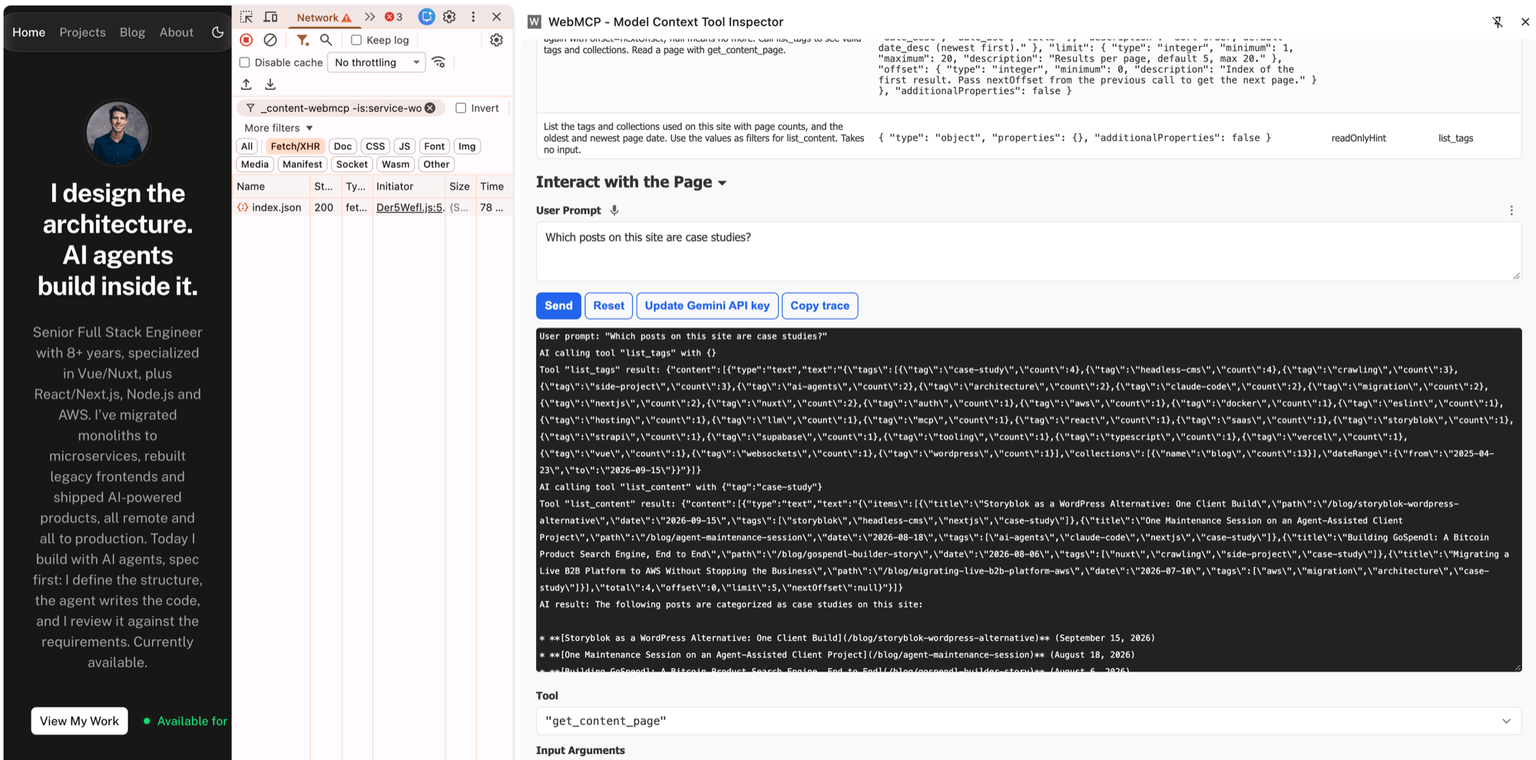
That's the reason list_tags exists. An agent can't filter by a tag it doesn't know about, and guessing keywords is less reliable than reading the site's own taxonomy.
Some answers don't need the full text
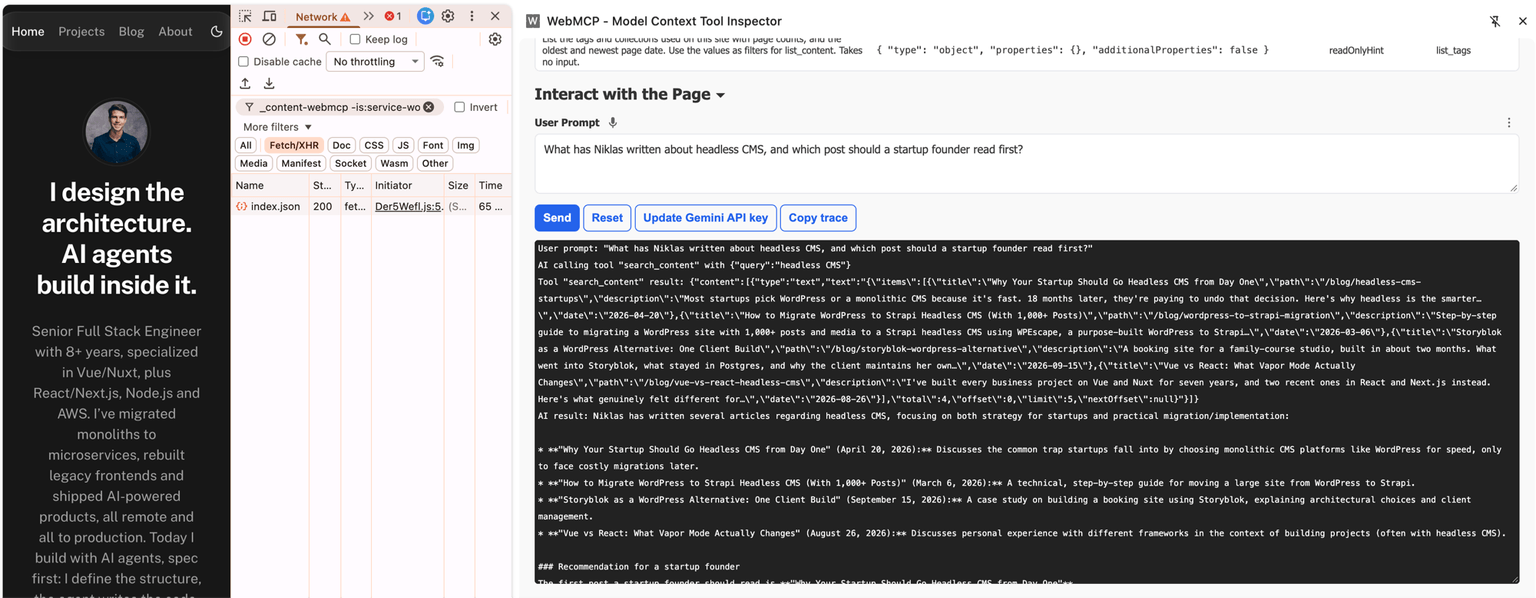
The third question: "What has Niklas written about headless CMS, and which post should a startup founder read first?"
One search_content call for "headless CMS" returned 4 posts with their descriptions. Gemini answered from those and recommended Why Your Startup Should Go Headless CMS from Day One. It didn't open any post. The Network tab shows only the 9.1 KB index.
Where the agent went wrong, and what I changed
When I ran the WebSockets question a second time, Gemini searched for "Niklas Nuxt WebSockets Vercel". The search required every word to match, and my name isn't in any title, tag or description, so it found nothing.
The result included a hint to try list_content, and Gemini followed it. Then it made up a path, /blog/nuxt-websockets-websockets-vercel. The tool returned an error saying there's no page at that path and to use search_content or list_content to find valid paths. On the next call it used the right path and read the post in the same 8 chunks.
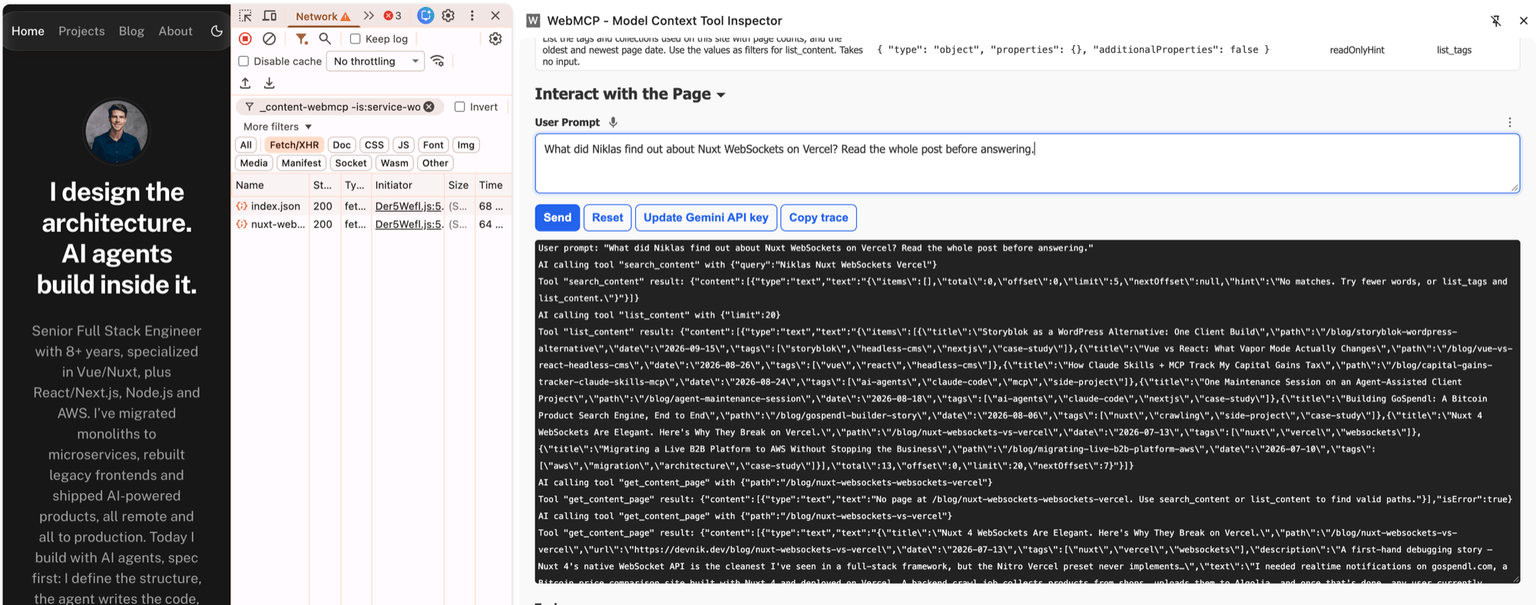
So the hints and error messages did their job, but the detour cost three extra calls. Agents put the author's name into search queries often enough that I changed the search: since version 0.1.1, when no post matches every word, search_content returns the posts that match some of them, ranked by how many, and marks the result with partial: true. The same query now returns the WebSockets post first.
Two build details that weren't obvious
The index can't come from a content hook. Nuxt Content v3 caches parsed files and skips its content:file:afterParse hook for files that haven't changed since the last build. An index built from that hook would be missing posts on every warm build. The module builds the index in a Nitro route instead, which reads every collection with queryCollection, and prerenders that route.
Nitro doesn't follow links from JSON responses. I first tried to get the per-post files prerendered by listing them in a response header that Nitro's prerenderer reads. That only works for HTML responses. The fix was to hook into the prerenderer: when the index route is generated, the module reads the paths from the index and adds one route per post to the prerender queue.
How it compares to nuxt-ai-ready
nuxt-ai-ready also registers WebMCP tools, as part of a broader set of AI features (llms.txt, an MCP server, content signals). It covers every route of a site and has full-text search through a database on the server. Its tool for reading a page returns the page up to the output limit and truncates the rest.
nuxt-content-webmcp does less. It only covers Nuxt Content, and search only looks at titles, tags, descriptions and excerpts. In exchange, agents can read complete posts in chunks, filter by tag and date, and everything runs from static files. If you want full-text search across a whole site, nuxt-ai-ready is the better choice. For a Nuxt Content blog or docs site, this module is the smaller tool for that one job.
Trying it
Add the module after @nuxt/content:
pnpm add nuxt-content-webmcp
// nuxt.config.ts
export default defineNuxtConfig({
  modules: ['@nuxt/content', 'nuxt-content-webmcp']
})
On the next build, it logs the index size, for example content index: 13 entries, 9.1 KB.
To check it locally, enable chrome://flags/#enable-webmcp-testing in Chrome, restart, and run this in the console of your site:
await document.modelContext.getTools()
For visitors' browsers without the flag, register an origin trial token for your domain and set it as NUXT_PUBLIC_WEBMCP_ORIGIN_TRIAL_TOKEN. nuxt-webmcp adds the meta tag. This blog runs with a token, so if you open it in a current Chrome with the Model Context Tool Inspector, you can ask it the same questions.
Not every agent uses WebMCP tools yet. The Claude in Chrome extension, for example, didn't list them when I tested, even though the console showed all four. The API is still an origin trial, so expect that to change.
The code, the configuration options and the hooks for adding your own tools are in the README on GitHub.
Migrating a Live B2B Platform to AWS Without Stopping the Business
A four-year migration moved a veterinary industry webshop off a legacy monolith onto an orchestrated AWS architecture, service by service, without ever pausing the live business.
Nuxt 4 WebSockets Are Elegant. Here's Why They Break on Vercel.
A first-hand debugging story — Nuxt 4's native WebSocket API is the cleanest I've seen in a full-stack framework, but the Nitro Vercel preset never implements the upgrade handshake. Vercel supports WebSockets fine; Nuxt's adapter for it just doesn't exist yet.