Why Your Startup Should Go Headless CMS from Day One
Most startups pick WordPress or a monolithic CMS because it's fast. 18 months later, they're paying to undo that decision. Here's why headless is the smarter choice from the start.

Niklas Grieger
I recently spent several weeks migrating a client's WordPress site to a headless CMS setup. Over 1,000 posts. Hundreds of media files. Custom post types. Plugins that had quietly accumulated over years.
It worked out fine in the end — but it didn't have to be that hard. If they had gone headless from day one, that migration project simply wouldn't have existed.
This post is for founders and CTOs making their first CMS decision. Let me save you the pain.
What Even Is a Headless CMS?
A traditional CMS like WordPress bundles two things together: the place where you manage your content (the backend) and the place where it gets displayed (the frontend). They're tightly coupled — one system does both jobs.
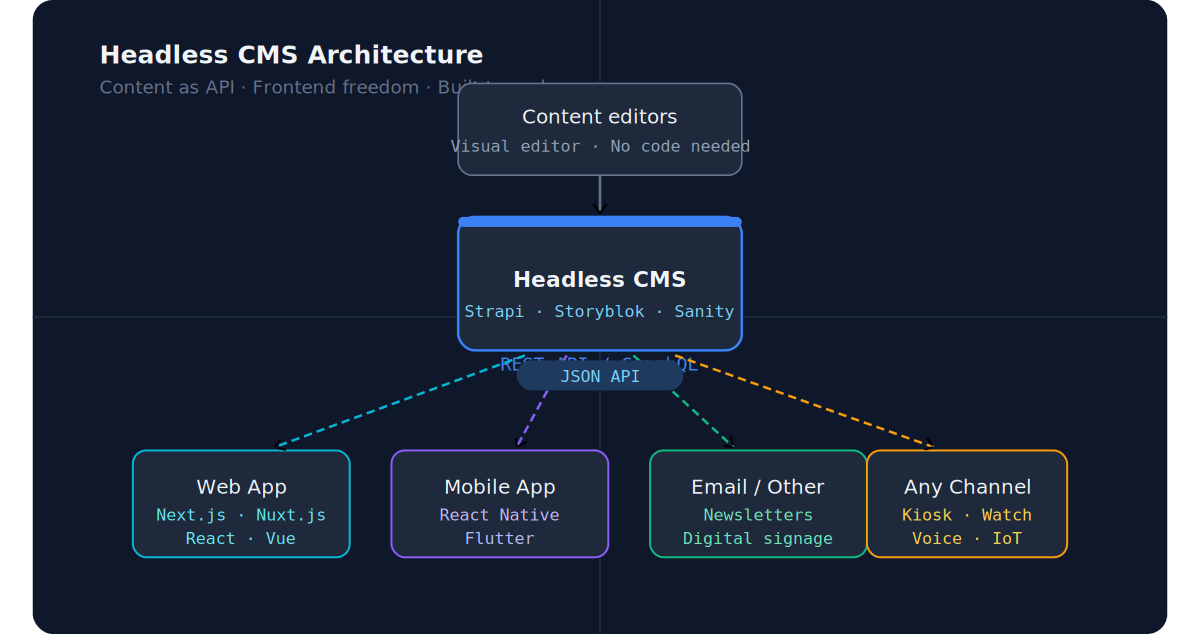
A headless CMS separates them. The CMS handles only content management and exposes everything via an API. Your frontend — whether that's a Next.js site, a mobile app, a kiosk, or all three — fetches that content and renders it however it wants.
The CMS has no "head" (no frontend). Hence: headless.
The Problem With Starting on WordPress
WordPress powers a huge portion of the web, and for good reason — it's fast to set up, there are plugins for everything, and non-technical people can manage content without developer help.
But for a startup building a product, it comes with a hidden cost.
Your frontend is locked in. Redesigning your site means working within WordPress's templating system. Want to move to Next.js or Nuxt.js later? You're essentially starting over.
Performance requires constant fighting. Caching plugins, image optimisation plugins, CDN plugins — you end up managing a stack of plugins just to get acceptable Core Web Vitals scores.
Scaling is painful. WordPress is a monolith. Under real traffic load, you're tuning PHP servers and MySQL databases rather than building features.
Developer experience suffers. Your engineers end up writing PHP and wrestling with WordPress hooks instead of working in the modern TypeScript stack you hired them for.
None of this matters if you're building a simple brochure site. But if you're a startup with ambitions to grow — a product, a marketing site, a blog, and eventually a mobile app — these problems compound over time.
What Headless Gives You From Day One
Frontend freedom
Your content lives in an API. Your frontend can be anything — Next.js, Nuxt.js, a React Native app, a Flutter app. You're not locked into any rendering technology.
True multichannel delivery
The same content API feeds your website, your mobile app, your email campaigns, and your digital signage if you ever need it. Write once, publish everywhere.
Better performance by default
When your frontend is a statically generated or server-side rendered Next.js or Nuxt.js app, you get excellent Core Web Vitals scores without fighting plugins. Your content is just data — your frontend decides how to render it optimally.
Non-technical editors still work independently
Modern headless CMS platforms like Storyblok have visual editors that are just as intuitive as WordPress for content teams. You don't sacrifice usability for technical flexibility.
Easier to scale
Your frontend scales on a CDN. Your CMS scales independently. No single point of failure, no shared bottleneck.
A Real Example: The Cost of Migrating Later
The client I mentioned at the start had a perfectly functional WordPress site. It had served them well for years. But as their product grew, they needed their marketing site to be faster, more flexible, and integrated with their product's design system.
The migration involved building a custom tool to export WordPress posts — preserving structure, metadata, categories, tags, authors, and embedded media — and importing everything into Strapi. Then rebuilding the frontend in Next.js to consume the Strapi API.
That project took weeks of engineering time. Weeks that could have been spent building product features, not undoing a past infrastructure decision.
The irony is that going headless from day one would have taken roughly the same amount of time as setting up WordPress — and saved all of that migration work later.
Which Headless CMS Should You Choose?
There's no universal answer, but here's a practical guide based on what I've worked with:
Strapi — Open source, self-hostable, highly customisable. Great if you want full control and have developers who can manage the setup. Free to self-host. My go-to for projects where the client wants to own their infrastructure.
Storyblok — Has a visual editor that non-technical users love. Component-based content model works beautifully with modern frontend frameworks. Best choice when your marketing team needs to build and edit pages independently.
Sanity — Extremely flexible content schema, great developer experience, and a real-time collaborative editor. Excellent for complex content models. Slightly steeper learning curve but very powerful.
Contentful — The enterprise standard. Reliable, well-documented, and has every integration you could need. Pricing scales up quickly as you grow, so better suited for funded companies.
My recommendation for most early-stage startups: Start with Storyblok if your marketing team needs autonomy, or Strapi if your developers want full control and you're cost-sensitive.
Not sure whether to build your frontend in Vue/Nuxt or React/Next.js? I wrote a full comparison here. If you want to go deep on either framework:
Affiliate links — I'm a partner of certificates.dev.
When Headless Is NOT the Right Choice
To be fair — there are situations where headless is overkill:
- You're building a pure personal blog with no plans to expand
- You have no frontend developers and need something running today
- Your site is a static brochure with three pages that never changes
- Your team is entirely non-technical and needs an all-in-one solution
In these cases, a traditional CMS or even a site builder makes total sense. Don't over-engineer for problems you don't have.
The Bottom Line
The best time to go headless is before you have 1,000 blog posts to migrate.
If you're at the start of building your startup's digital presence and you have — or plan to hire — developers, choosing a headless CMS from day one is almost always the right call. You get flexibility, performance, and scalability baked in from the start, without paying the migration tax later.
Building a startup and not sure which CMS setup fits your situation? I help teams architect and implement headless CMS setups from scratch — or migrate from existing systems. Let's talk.
Building GoSpendl: A Bitcoin Product Search Engine, End to End
A product search platform for the Bitcoin community, built solo - the crawler that scales without burning LLM tokens, the realtime layer that broke on Vercel, the $5/month host that runs it all. Here's the whole build, and where it stands now.
How I Built a Token-Efficient Crawler for 900+ Shops with Crawl4AI
I needed to crawl 900+ e-commerce shops dynamically for GoSpendl. Here's how I combined Crawl4AI's LLM Strategy for one-time schema discovery with CSS Extraction for production crawls — and why that matters for token costs.