How I Built a Token-Efficient Crawler for 900+ Shops with Crawl4AI
I needed to crawl 900+ e-commerce shops dynamically for GoSpendl. Here's how I combined Crawl4AI's LLM Strategy for one-time schema discovery with CSS Extraction for production crawls — and why that matters for token costs.

Niklas Grieger
My journey
I'm building GoSpendl — a product search platform for the Bitcoin community. Users can find Bitcoin-related products across hundreds of shops, and if they have a Nostr account, they can earn satsback cashback on purchases.
To show products, I need to crawl many different e-commerce websites dynamically — triggered by user search queries, not upfront. Traditional crawling requires you to define a CSS schema per website, and the moment a shop redesigns their page, your schema breaks silently.
I started researching AI-powered crawling and found a ton of tools. It can be overwhelming. This post documents what I tried, what didn't work, and how I ended up with a two-phase approach that keeps token costs under control across 900+ shops.
The challenges
900+ shops, 10k+ products each — I can't save everything
Problem 1: Crawling and storing every product from every shop upfront is not feasible at this scale.
Problem 2: Every shop has a different design and HTML structure.
Problem 3: Not all of them are standard e-commerce shops — some sell e-SIMs, domains, VPN subscriptions, etc.
My solutions:
- Instead of crawling product detail pages, I only crawl the search results page of each shop (e.g.
https://webshop.de/search?q=ipad). Smaller payload, triggered on demand. - For the HTML structure problem: I found a way to use AI once per shop to generate a reusable CSS schema — more on that below.
- For non-standard shops: still an open challenge. The AI correctly declines these pages most of the time, which at least avoids bad data.
Tools I explored
Before landing on a solution, I tried three tools. The short version: all of them had dealbreakers for my specific case.
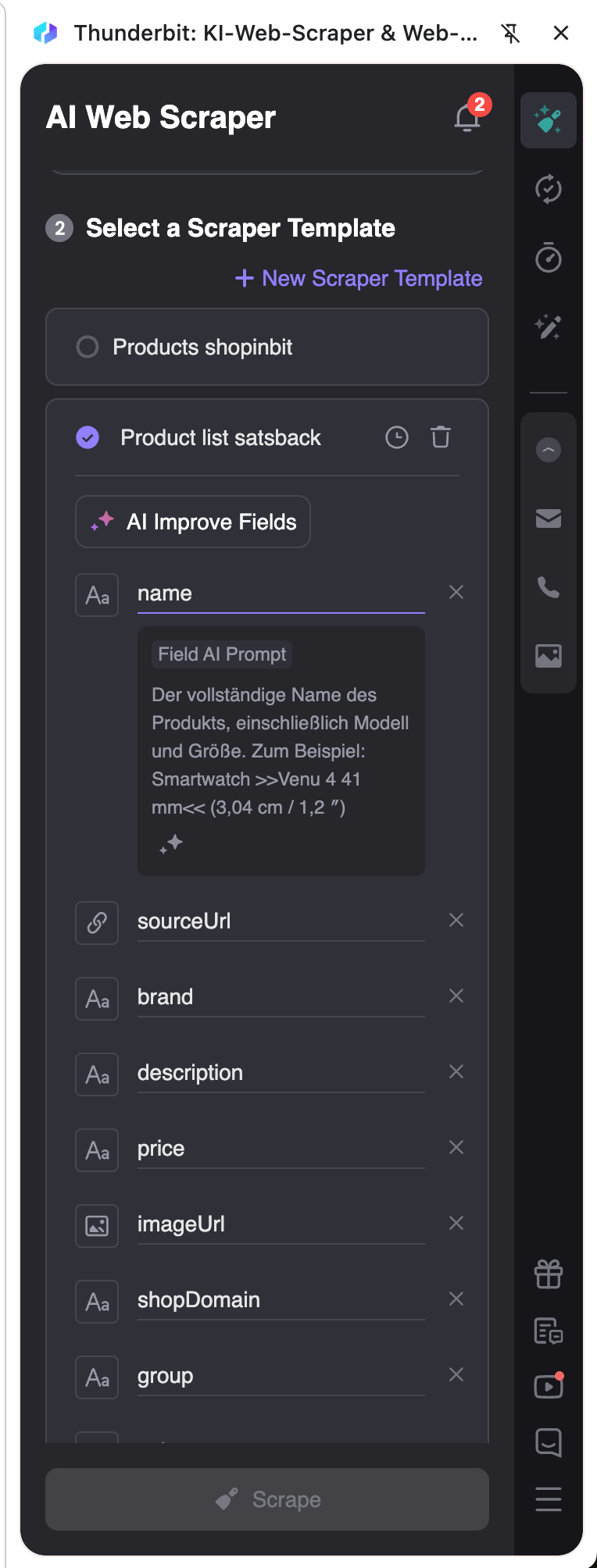
Thunderbit (thunderbit.com) worked surprisingly well in their Chrome Extension — no CSS schema needed, just define fields with a prompt, and it handles pagination too. But it has no API. For dynamic crawling across hundreds of shops on demand, that's a hard stop. I'd recommend it for manual, small-scale exports.
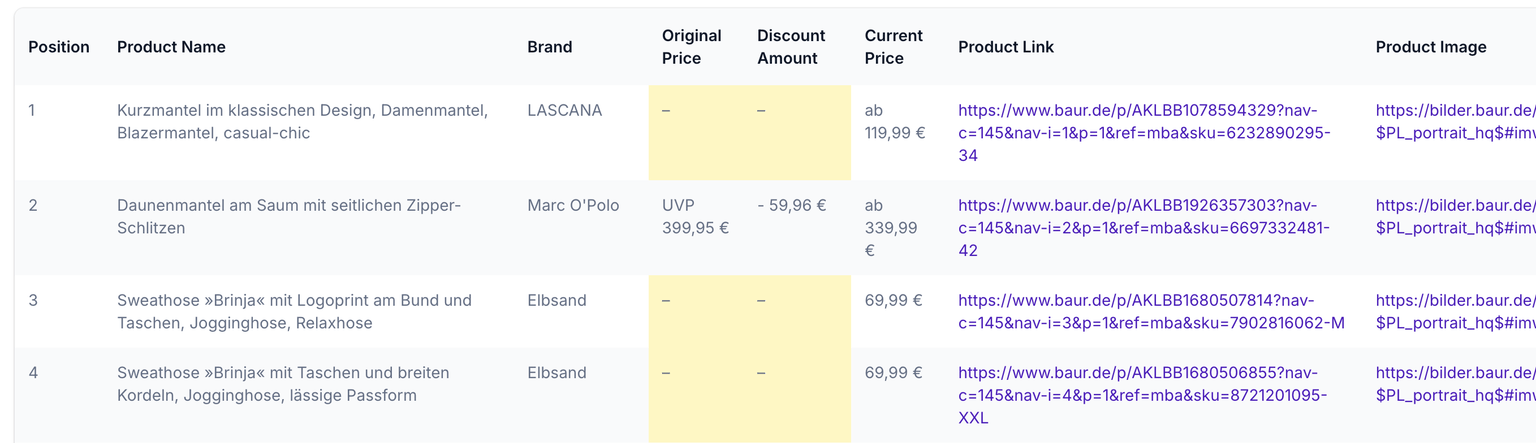
Browse.ai (browse.ai) extracted data but missed price fields, and the pricing doesn't scale to 900+ shops.
Firecrawl was the most promising — developer-friendly REST API, LLM extraction, highly customizable. But in practice I got missing data (lazy loading issues), timeouts, and accidentally burned all my credits in one API call. JSON array extraction also had quirks in the playground. I might revisit it, but it wasn't reliable enough at the time.
Crawl4AI — my solution
Crawl4AI is an open-source crawler built for LLM integration. It runs a real Chromium browser via Playwright, handles JavaScript rendering, and supports multiple extraction strategies. Self-hostable via Docker, no API keys required.
What sold me: it separates how you crawl (browser config) from how you extract (strategy). That distinction turned out to be the key to solving my token cost problem.
The core problem: LLM extraction doesn't scale to 900 shops
Crawl4AI's LLMExtractionStrategy sends the page HTML to an LLM on every crawl request. That works fine for one or two shops. For 900+ shops, triggered multiple times per user search query — it's a token cost nightmare.
My solution: two-phase crawling
Phase 1 — Schema Discovery (once per shop, offline):
Use the LLM to analyze a shop's search results page and generate a JsonCssExtractionStrategy schema. This happens once, the result is stored in store-overrides.json.
Phase 2 — Production Crawl (every user query, zero LLM calls):
Use the stored CSS schema directly. Pure CSS extraction — no LLM involved, no token cost per request.
Why search results pages, not product detail pages
Product detail pages have too much variation — sale layouts, out-of-stock states, variant pages, related product carousels. The LLM often grabs the wrong region.
Search result listing cards are different: they follow one repeating pattern in the HTML (a <li class="product-tile"> repeated 24 times). Schemas generalize across queries on the same shop and even across shops built on the same CMS (Shopify, for example).
What I learned the hard way
Use raw HTML, not cleaned HTML.
Crawl4AI's cleaned_html strips many CSS class names that the LLM relies on for pattern recognition. Switching one shop (baur.de) from cleaned_html to raw result.html went from 0 extracted cards to 72. Always use the raw field when feeding HTML to the LLM.
scan_full_page is non-negotiable.
Many shops lazy-load product images. Without scan_full_page: true, the crawler returns cards without imageSrc. Enabling it took one shop from 14% image coverage to 100%.
Give the LLM an explicit opt-out.
Without a clear "if you can't find a pattern, return { baseSelector: null, fields: [] }" clause, the LLM hallucinates plausible-looking CSS selectors (.product-tile, .price-current) that don't exist in the actual HTML. These produce schemas that look valid but extract nothing. With the opt-out, the LLM correctly declines shops it can't handle — and we skip them cleanly.
List anti-patterns explicitly in the prompt.
"Do NOT target autocomplete dropdowns, navigation menus, breadcrumbs, related-products carousels, footer widgets, recently-viewed widgets, filter facets, or pagination links." Without this, the LLM cheerfully grabbed Shopify's visually-hidden accessibility helper as the listing container.
Add a plausibility guard before writing to Algolia.
Even with a good prompt, some schemas slip through targeting the wrong HTML region. I run three checks after extraction:
- If >50% of extracted product URLs duplicate each other → reject (matched a non-card element)
- If most URLs look like
/search?q=…or/category/…→ reject (matched navigation) - If ≥5 cards were extracted but every
namefield is empty → reject (wrong region)
These three checks caught several batches of bad data before they reached Algolia.
Shopify's imageAlt fallback.
Shopify themes often render the product title only as the image's alt attribute on listing cards. The LLM extracts an empty name field, then the plausibility guard fires. Both the schema generator and the webhook now copy imageAlt → name when name is empty. This alone salvaged several Shopify-based shops.
Real numbers from GoSpendl
On a random sample of 30 shops:
- ~33% produced working schemas on the first attempt
- ~43% the LLM correctly declined (no usable pattern found)
- ~7% failed the plausibility guard — bad data caught before reaching Algolia
- ~17% infrastructure errors (Crawl4AI timeouts, Cloudflare blocks on heavily protected shops)
With hand-picked shop variety (filtering out known anti-bot shops upfront), the success rate jumps to 60–70%.
The crawler config that matters
Both the schema generator and the production crawler must use the exact same Crawl4AI config, otherwise schemas validated in generation break in production:
{
  cache_mode: 'BYPASS',         // always see fresh DOM
  scan_full_page: true,         // lazy-load fix
  scroll_delay: 0.5,
  wait_for_images: true,
  delay_before_return_html: 2.5,
  simulate_user: true,
  override_navigator: true,
  headers: {
    'User-Agent': 'Mozilla/5.0 (Windows NT 10.0; Win64; x64) ...',
    'Sec-CH-UA': '"Not_A Brand";v="99", "Google Chrome";v="120"',
    'Sec-CH-UA-Mobile': '?0',
    'Sec-CH-UA-Platform': '"Windows"',
  }
}
The Sec-CH-UA client hints helped with some Cloudflare-fronted shops. They're not a silver bullet — a handful of shops still block the crawler — but they noticeably improved coverage.
What's next
The crawl pipeline for GoSpendl is live and running. The current crawlable set covers around 14 shops with validated schemas. The schema generator (pnpm gen:schema) makes it straightforward to add more — run it against a shop's search URL, review the summary, persist it with pnpm save:schema.
Remaining challenges:
- Cloudflare-heavy shops need a residential proxy or stealth Playwright integration — not built yet
- Non-standard shops (e-SIM providers, domain registrars) are still hard to handle with CSS schemas
- Category inference is currently keyword-based; an LLM-backed classifier would be more robust at scale
If you're building something similar — crawling product data across many shops without blowing your LLM token budget — the two-phase approach (LLM once for schema discovery, CSS extraction for every real crawl) is worth considering. It's the pattern that made GoSpendl work at scale.
The project is open source: github.com/devonik/go-spendl
Why Your Startup Should Go Headless CMS from Day One
Most startups pick WordPress or a monolithic CMS because it's fast. 18 months later, they're paying to undo that decision. Here's why headless is the smarter choice from the start.
Migrating a Live B2B Platform to AWS Without Stopping the Business
A four-year migration moved a veterinary industry webshop off a legacy monolith onto an orchestrated AWS architecture, service by service, without ever pausing the live business.